

Three ways in
Pick the ways that suit each room.
Live code
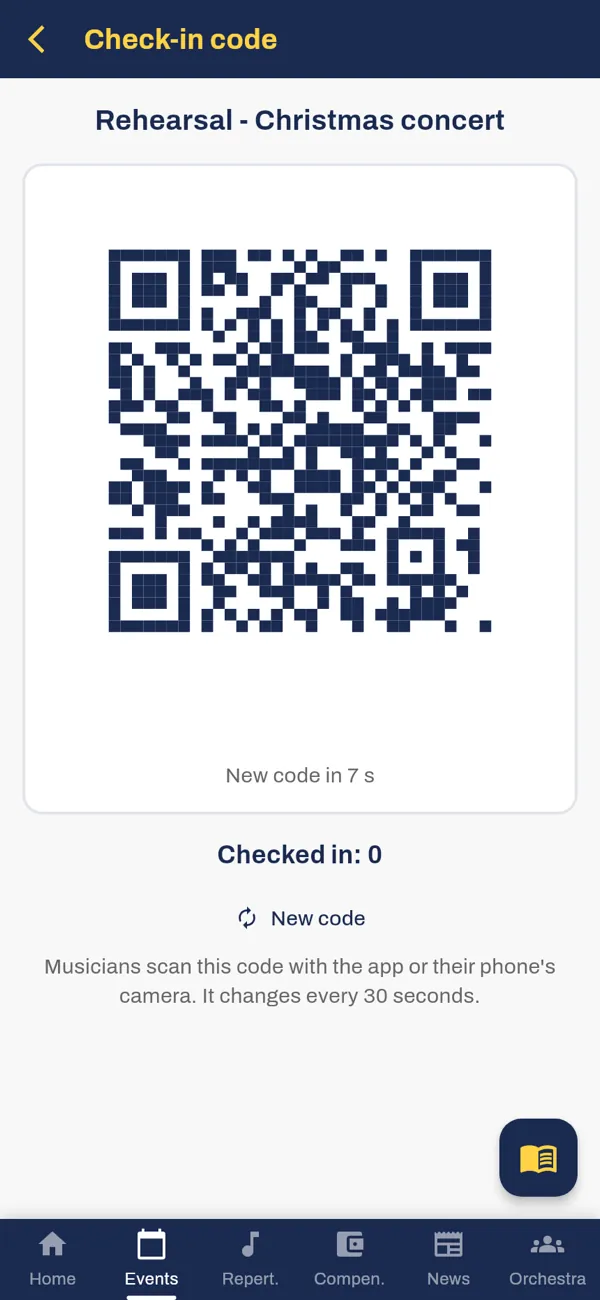
A code on a staff phone, tablet or laptop at the door. It changes every 30 seconds, so a photo of it stops working within about a minute.
Poster
An A4 poster for each venue’s wall, with the orchestra, the venue, a code and three short steps, in your orchestra’s language.
Location
The phone’s position at the venue. You place each venue on a map and set how far from that point still counts as there.
The live code on a staff screen is the reliable proof that someone is in the room. A photo of the poster can be shared, and a phone’s location can be faked by someone determined: use the live code when presence really matters.

Your rules
Set it once in Orchestra › Check-in.
- Ways to check in: live code, poster and location, each with its own switch.
- When it opens: from 0 to 240 minutes before the start. It closes when the event ends.
- When it counts as late: from 0 to 60 minutes after the start.
- Venue positions: take the position standing in the hall, or look it up from the address, with a radius from 50 to 1,000 metres.
- Posters: create, print again or replace; a replaced poster stops working at once.
What staff see
Every arrival, in Attendance.
Open the event and tap Check-in code: the code, a countdown and how many musicians have checked in, refreshed every 15 seconds. Opened once with a connection, it also works in a room without network.
In the event’s Attendance, each musician who checked in has a chip with the time and the way they checked in, amber with Late when they arrived late. The count bar gains a checked in figure. A check-in sets the musician’s answer to yes; staff can still correct it, and their change wins.
For musicians
One tap at the door.
- The Check in button appears on the event from a while before the start until it ends.
- It then reads Checked in at 20:58, or Late in amber after the start and the grace time.
- No signal in the hall? Scan anyway: the app keeps the check-in with the time and sends it within 12 hours.
- Each musician’s history marks the events where they arrived late.
- Parents with guardian accounts check the whole family in with one scan (families).
Questions about self check-in
Which plan includes self check-in?
Self check-in is part of the Professional plan, €150 a year. WePlayIn.Band turns it on for your orchestra, and managers then choose the ways to check in, when it opens and when an arrival counts as late.
Can a musician share a photo of the code?
The live code on the staff screen changes every 30 seconds, so a photo of it stops working within about a minute. A photo of the venue poster can be shared, and a phone’s location can be faked, so use the live code when presence really matters.
What if there is no signal in the rehearsal room?
Musicians scan the code anyway. The app keeps the check-in with the time it was scanned and sends it when the phone is back online, within 12 hours; staff see it marked as sent later. The live code also works offline once it has been opened with a connection.
Does a check-in overwrite what staff decided?
A check-in marks the musician as attending, and staff can still correct it from Attendance: their change wins. When staff had already marked someone absent, the check-in is recorded but the answer stays as it was.
Related
Features →For managers →Families and young musicians →Pricing →
Try self check-in at your next rehearsal.
We set up your ensemble with you on a short call, then you try every Professional feature free for 30 days.